Overview
The Single Use Coupon Lookup report helps you find single-use coupon codes and check their status. Single-use codes are unique, one-time codes (they start with `SU-`) that are generated from a coupon in your inventory and handed out individually. More Information on Single Use Coupons here: Single-Use Coupons
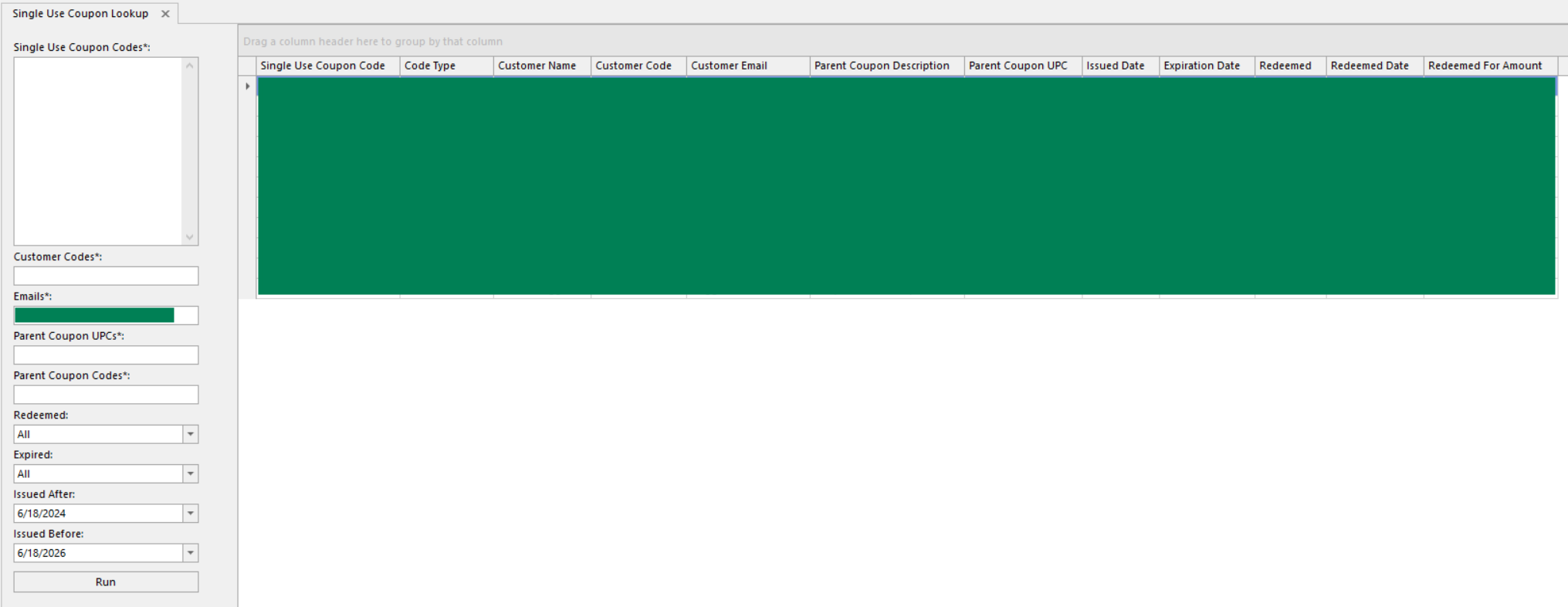
The report can be found under Customers > Coupons
Note: If you do not see the report, contact FieldStack Support.
Controls
Fill in at least one of these to search:
- Single Use Coupon Codes - paste one or more 'SU-' codes (one per line or comma-separated)
- Customer Codes - one or more customer codes (comma-separate for several)
- Customer Emails - one or more customer email addresses
- Parent Coupon UPCs - the UPC of the coupon the codes were generated from
- Parent Coupon Codes - the code of that coupon (Ex: "NEWPET20")
You can then narrow the results with these optional filters:
- Redeemed - All, Redeemed, or Unredeemed
- Expired - All, Active (still usable), or Expired
- Issued After / Issued Before - limit to codes generated within a date range. These default to roughly the last two years.
Click Run to see the results.
Report Columns
Each row is one single-use coupon code. The columns:
| Column | Definition |
| Single User Coupon Code | The generated SU- code |
| Code Type | Customer-bound (tied to one specific customer) or Generic (usable by anyone) |
| Customer Name / Customer Email | Who the code belongs to. For a generic code that's already been used, this shows the customer who redeemed it |
| Parent Coupon Description | Description from the parent coupon |
| Parent Coupon UPC | The UPC of the coupon it came from (may be blank for special, ad-hoc coupons) |
| Issued Date | When the code was generated |
| Expiration Date | When the code expires |
| Redeemed | Whether it's been used (Yes / No) |
| Redeemed Date | When it was redeemed |
| Redeemed For Amount | The discount amount the code gave when it was used |
Double-click shortcuts:
- Double-click Customer Code to open that customer's record
- Double-click Parent Coupon UPC to open the parent coupon in the item edit screen
- Double-click Redeemed Date to open the transaction where the code was used
Tips & Notes
- You must enter at least one of: Coupon Codes, Customer Codes, Customer Emails, or a Parent Coupon.
- Generic codes show a customer only once they've been redeemed (before that, no one is assigned to them).
- Some special, ad-hoc coupons don't have a UPC. If a coupon won't come up under Parent Coupon UPCs, search by Parent Coupon Codes instead.
- The Issued After / Issued Before dates always apply. If you're looking for an older code and it isn't showing, widen the Issued After date.
Was this article helpful?
That’s Great!
Thank you for your feedback
Sorry! We couldn't be helpful
Thank you for your feedback
Feedback sent
We appreciate your effort and will try to fix the article