Overview
Items in FieldStack can have differing taxation based on state. This uses the Attribute Management system and TaxJar's tax API.
When an item with a special taxability attribute is sold, either at the point of sale or through the web store, the system determines the correct tax rate based on the item's tax category and the store's location. If a state changes its taxability rules, the updated rate will be applied automatically.
Note: This feature must be enabled per location by FieldStack Support.
How to Set Up Items with Special Taxability
1. Create the Attribute
- Create an attribute type called SpecialTaxabilityCode in Attribute Management.
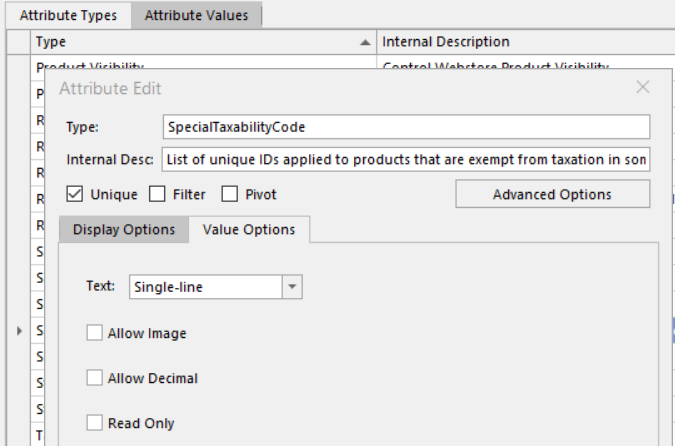
2. Find the TaxJar Code
- Go to the TaxJar Sales Tax API Reference
- Search for the product category that requires a special taxability check
- Copy the code for that category
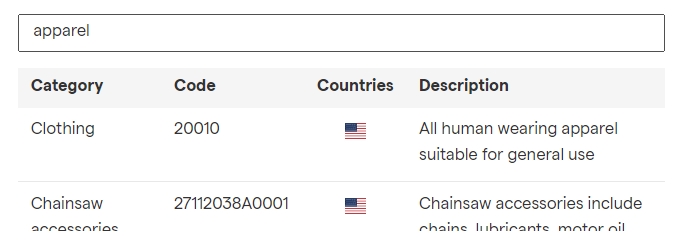
3. Add the Attribute to Items
- Go to the Attribute Values tab and add each TaxJar code as the Text Value, with an Internal Description for your reference
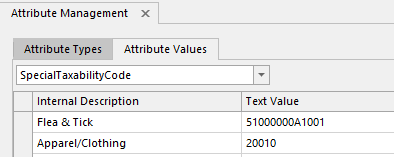
- Using Item Search or Find Item Advanced, locate the items that need the special tax check
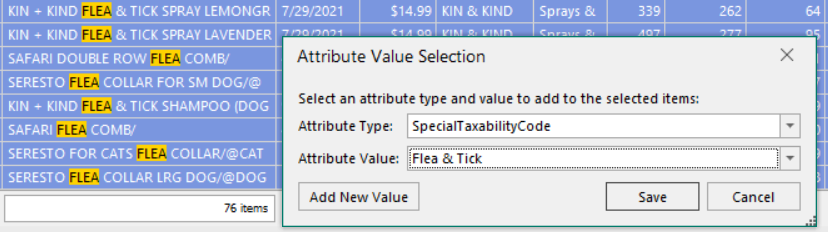
- Multi-select the items, right-click, and select Add Attribute Value
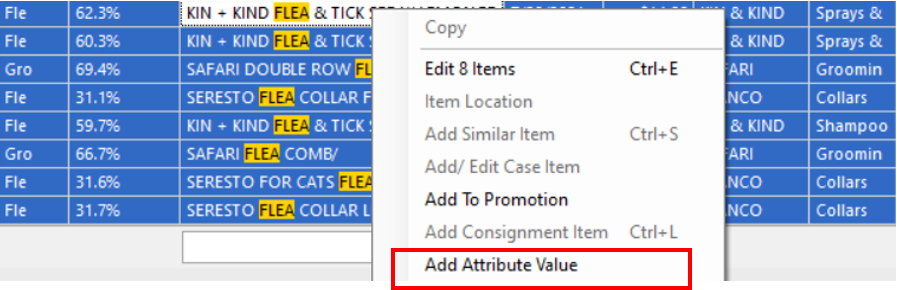
- Choose the SpecialTaxabilityCode attribute type and the value matching the TaxJar code
4. Contact FieldStack Support
- Let FieldStack Support know which locations need this feature enabled. Once activated, items with the attribute will be checked at point of sale and their taxability will be adjusted based on the TaxJar rules for that code in that state.
Was this article helpful?
That’s Great!
Thank you for your feedback
Sorry! We couldn't be helpful
Thank you for your feedback
Feedback sent
We appreciate your effort and will try to fix the article