Sometimes you may want to prevent specific items from being listed on Amazon or available for order through the web store. This could include generic sales items (such as grab bags or incense) or limited edition items you want to save for in-store customers.
Block Types
There are two types of blocking:
- No Marketplace Sales (IN2): Blocks the item from being automatically listed on Amazon or other marketplaces. Does NOT block the item from appearing on the web store.
- Use this if you want the item sold through your website but not through Amazon.
- No Internet Sales (IN1): Blocks the item from being listed on any internet platform - web store, Amazon, eBay, etc.
- Use this to block an item entirely from all online sales.
Applying a Block
- Open the item in the Edit Item screen
- Change the Additional Type field to either IN1 or IN2
The block must be set in the Additional Type field for it to take effect.
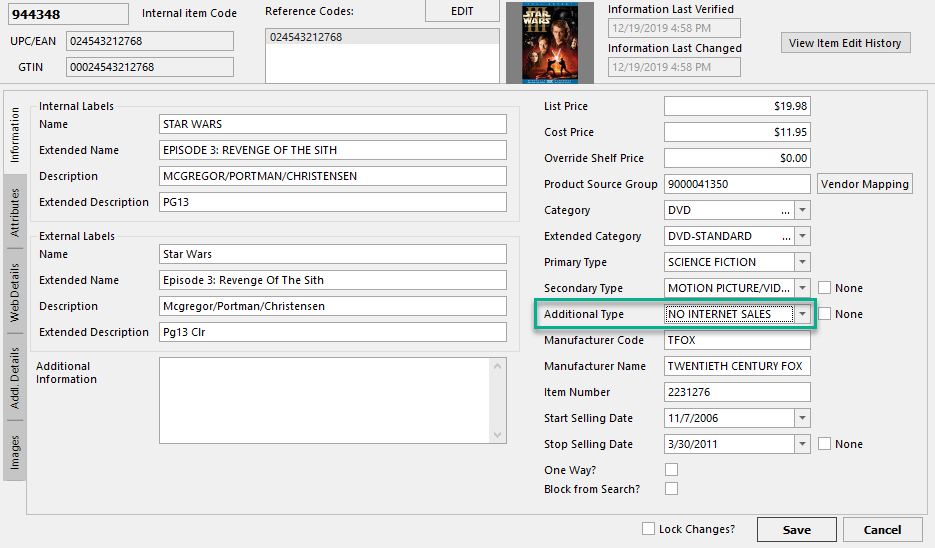
If an item is marked as NO INTERNET SALES, it will also show up as purple in item search results, like this: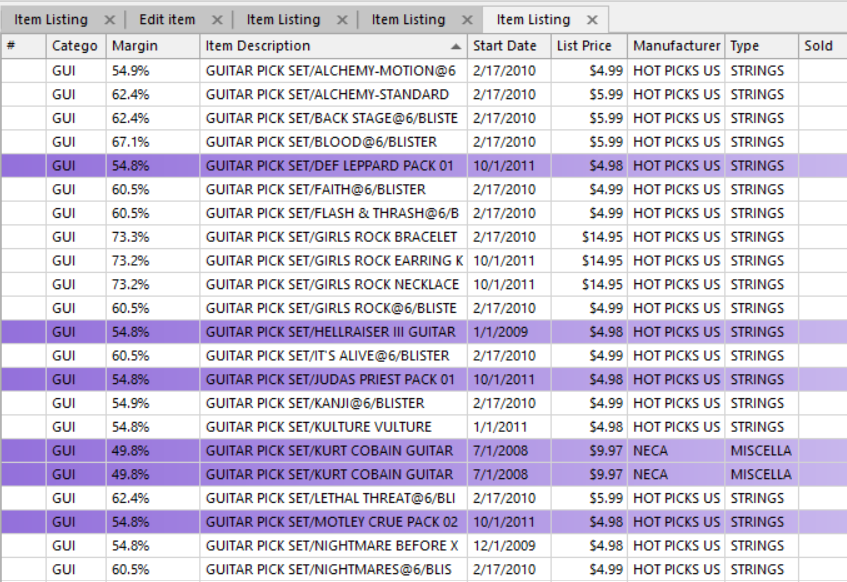
After Blocking
Changes may not appear on the web store immediately. To apply the block right away, go to the Web Store Administration Page and flush Products and Attributes. Otherwise, the change will take effect after the next scheduled cache refresh.
See the article Web Store Administration Page for more information.
Was this article helpful?
That’s Great!
Thank you for your feedback
Sorry! We couldn't be helpful
Thank you for your feedback
Feedback sent
We appreciate your effort and will try to fix the article
