Overview
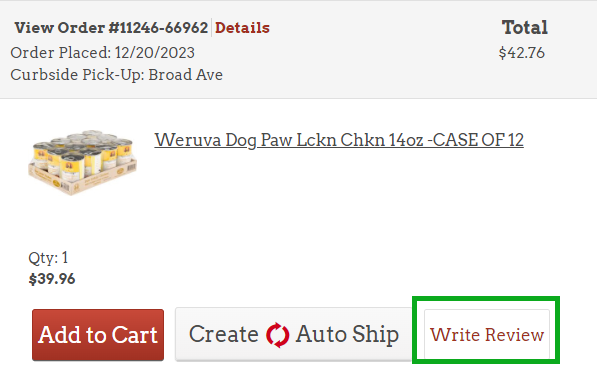
Customers can leave product reviews on your web store when the feature is enabled. The "Write Review" option appears beneath each item in a customer's order history. All reviews go through a moderation process before appearing publicly.
Review Settings
Product reviews are controlled by these settings, configured by FieldStack Support:
- Enable Reviews - turns the product reviews feature on or off for your web store
- Approval Required - when enabled, reviews go to the Pending tab for moderation before publishing. When disabled, reviews are published immediately.
- Who Can Write Reviews - controls who is allowed to submit reviews:
- Anyone (including guests)
- Logged-in users only
- Verified purchasers only
- Helpfulness Voting - enables or disables the helpful/unhelpful voting buttons on published reviews
To change any of these settings, contact FieldStack Support.
Where to Find It
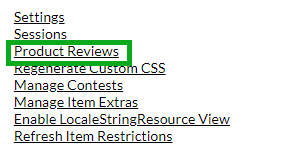
Go to your web store admin page and select Product Reviews.
For more on accessing the admin page, see: Web Store Administration Page
Pending Tab
New reviews appear here first. They are not visible to customers until approved.
- Approve - publishes the review on the product page
- Remove - moves the review to the Removed tab (not visible to customers)
- Respond - add a response to the review. The response will not be visible until the review is approved.
- Delete Response - remove a response from a review
- Bulk Actions - select multiple reviews to approve or remove at once
- Refresh - load any newly submitted reviews
Each review shows the customer's rating, username, email, and review text. Vote counts show as 0 for pending reviews.
Approved Tab
Shows all published reviews. From here you can:
- Remove - unpublish the review (moves to Removed tab)
- Unapprove - send back to Pending tab
- View Helpful votes - tallied from customers clicking the thumbs-up icon on the product page
Removed Tab
Shows reviews that were removed. From here you can:
- Approve - publish the review
- Unremove - send back to Pending tab
Both actions can be done individually or in bulk.
Was this article helpful?
That’s Great!
Thank you for your feedback
Sorry! We couldn't be helpful
Thank you for your feedback
Feedback sent
We appreciate your effort and will try to fix the article