Overview
Location Attribute Management allows you to apply attributes to store locations, similar to how item attributes are applied to products. This can be used to track location-specific details like available services, equipment counts, or feature toggles.
Note: This feature must be enabled at the company level. If you don't see the option, contact FieldStack Support.
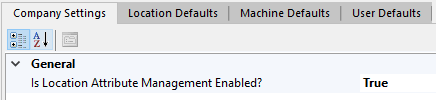
Where to Find It
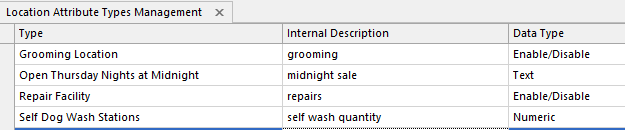
- Managing attribute types: Go to the Locations Tab > Manage Location Attributes
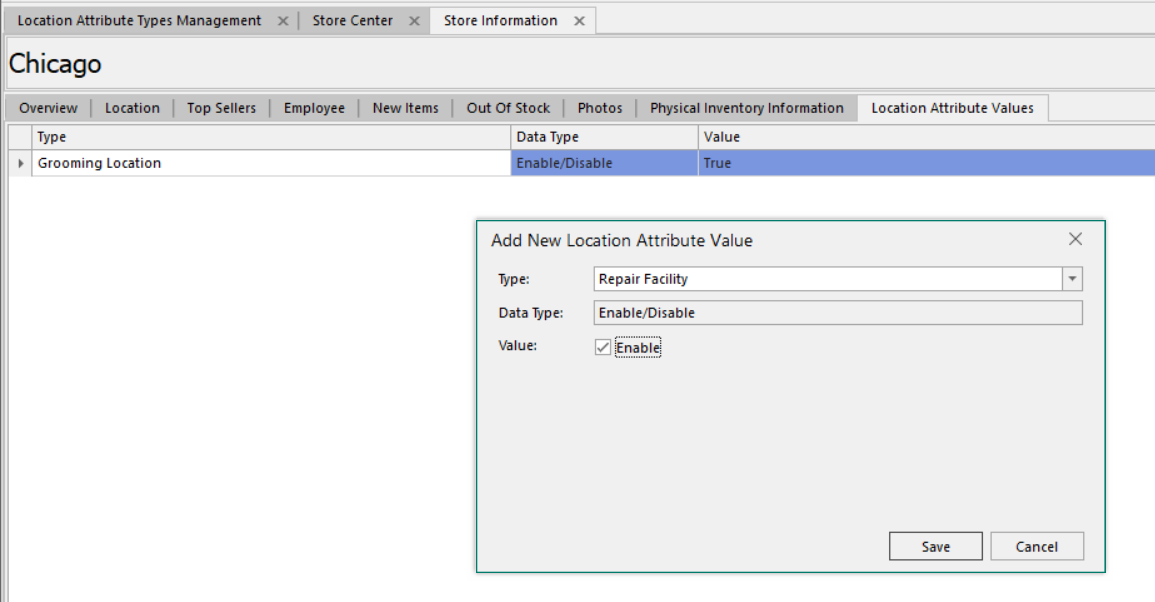
- Applying attributes to a location: Go to Store Center > select a location > Location Attribute Values tab
Attribute Data Types
When creating a location attribute type, choose one of three data types:
| Type | Description | Example |
| Text | Free-text description | "Offers grooming services", "Open for midnight events" |
| Numeric | A number (supports decimals) | Number of dog wash stations, number of job openings |
| Enable/Disable | An on/off toggle per location | Curbside pickup available, gift wrapping offered |
Applying Attributes to a Location
- Open Store Center and select the location
- Go to the Location Attribute Values tab
- Add attribute values as needed - numeric fields accept decimals, enable/disable fields can be toggled on or off.
Users with Store Center editing permissions can create and apply attributes.
Current Usage
This feature is currently used for API and app visibility. Integration into web store pages is planned for a future release.
Was this article helpful?
That’s Great!
Thank you for your feedback
Sorry! We couldn't be helpful
Thank you for your feedback
Feedback sent
We appreciate your effort and will try to fix the article