Version 12.2026.0709.6
1. Passwordless Sign-In — Reliability Improvements
Fixed: Phone sign-in errors during checkout and login
Customers using phone-based sign-in could occasionally receive a timeout error while the system searched for their account. Phone lookups are now faster and more reliable.
Fixed: SMS confirmation link opened the wrong page
The “Confirm this device” link sent by text message previously opened the customer’s Account page. It now correctly opens the store homepage.
Signing in with a one-time code will continue returning customers to the page they were previously viewing.
Setup note: An additional App Service setting is required. Jeff from the dev team can configure it.

2. Single-Use Coupon Redemption Details
Previously, the system stored only the following information when a single-use coupon was redeemed:
- Redemption date
- Customer code
- Discount amount
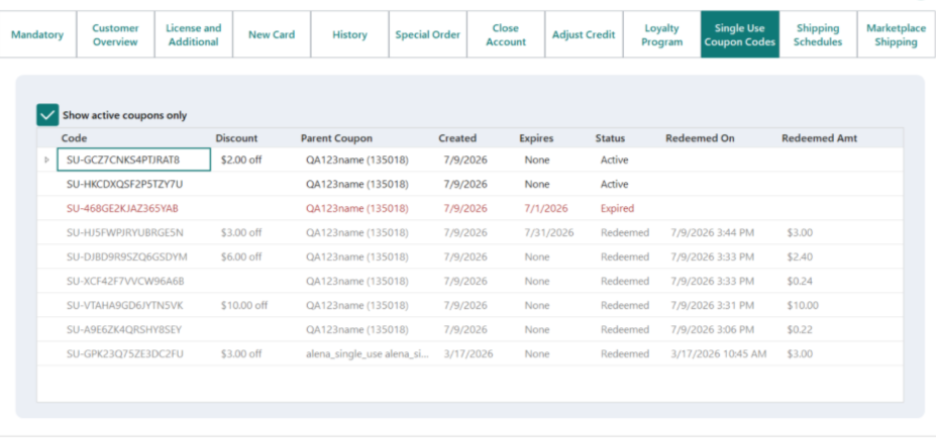
The system now also records:
- WebStore order where the coupon was used
- The cart total before the discount
- Cart line details, including item codes, quantities, and line prices
To view this information, open the customer in FieldStack and go to the Single-Use Coupons tab on the Customer Edit screen.
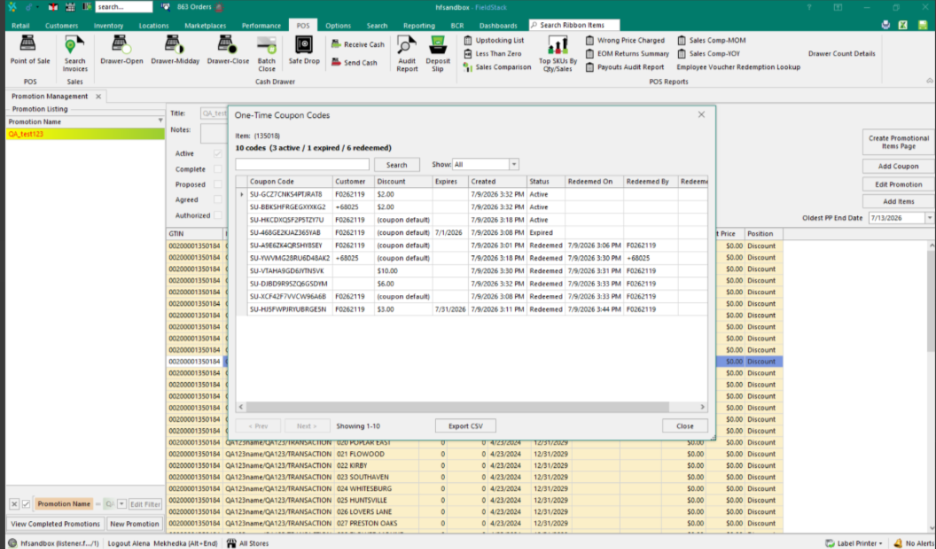
The information can also be viewed from the coupon details screen.
3. VireoTS / Typesense Search Preparation
We have added the underlying infrastructure for a new, faster search-engine option using Typesense.
This is infrastructure work only and does not change the current customer search experience. Typesense is currently available for internal testing and may be enabled for individual stores in the future without disrupting the existing search functionality.

4. eGift Cards and Donations — Checkout Fix
eGift cards, donations, and similar digital items now consistently remain set to electronic delivery throughout checkout, regardless of session timing.
Physical items are not affected.

5. SMS Marketing Consent Sync with Cordial
Updates to customer contact information and email or SMS marketing consent are now sent to Cordial approximately every minute instead of waiting for a scheduled batch window.
This allows opt-out requests and customer profile changes to reach Cordial sooner.

6. Auto-Apply Single-Use Coupons in WebStore
Previously, customers had to enter single-use coupon codes manually.
WebStore can now automatically find and apply valid single-use coupons assigned to a logged-in customer.
Key behavior:
A new setting was added: CommonSettings.AutoApplyOneTimeUseCouponsWebStore.
Auto-apply works only when both of the following settings are enabled:
EnableOneTimeUseCouponCodes
AutoApplyOneTimeUseCouponsWebStore
All eligible coupons are applied, beginning with the coupon that expires first.
If a customer removes an automatically applied coupon, it will not be added again during the same session.
The coupon may be automatically applied again during a future session.
Coupons already redeemed in POS or WebStore will not be offered again.
Coupons are not automatically loaded for guest shoppers.
Manual coupon entry continues to work.
Coupons are marked as redeemed after the order is successfully placed.

Version 12.2026.0715.7
1. Customer Assist — Email Address Fix
Fixed an issue where Customer Assist could fail for customers whose email addresses contained special characters, such as +.
Customer Assist now correctly opens the intended customer account for all valid email formats.

2. Autoship — Minimum Daily Frequency
A new setting allows stores to enforce a minimum number of days between autoship orders:
CommonSettings.MinimumDailyAutoshipFrequency
Changing this setting does not automatically update existing autoships.
For example, if an existing autoship is scheduled every three days and the minimum is changed to seven days, the existing autoship will remain unchanged. The new minimum applies when an autoship is created or updated.

3. Autoship Payment Updates and Failed-Order Resubmission
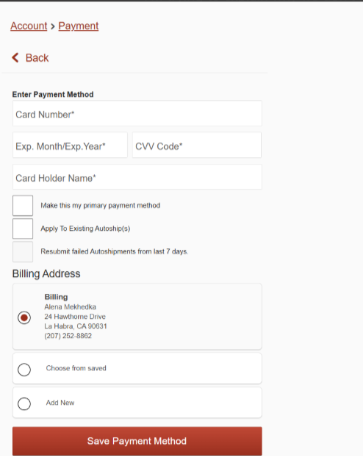
When customers add a new credit card from Account Management, they can now choose to apply that payment method to their existing autoship subscriptions.
This functionality is intentionally available only in Account Management and does not appear during checkout.
The autoship options are hidden when the customer does not have any active autoships.
Customers may also choose to resubmit recently failed autoship orders using the newly added payment method. For example, an autoship order that failed because of a declined or outdated card may be resubmitted if it falls within the configured lookback period.
The default lookback period is seven days.
New settings:
- CommonSettings.AllowPaymentToApplyToAutoship
Enables the option to apply the new payment method to existing autoships.
- CommonSettings.AllowPaymentToResubmitAutoship
Enables the option to resubmit failed autoship orders using the new payment method.
- CommonSettings.AutoShipPaymentErrorsDaysBack
Controls how many days back the system searches for failed autoship orders. The default is seven days.
Setup note: These features are opt-in and remain disabled until the applicable settings are enabled for the store.

4. Billing Address Validation — Blank Address Fix
Blank billing addresses can no longer be saved or attached to a payment method in WebStore, mobile, or admin workflows.
Customers and staff will now receive a clear validation message instead of encountering a failed charge or server error.
Existing payment methods already associated with a blank billing address are not automatically corrected by this update. Those payment methods may still need to be updated manually.
Was this article helpful?
That’s Great!
Thank you for your feedback
Sorry! We couldn't be helpful
Thank you for your feedback
Feedback sent
We appreciate your effort and will try to fix the article