Improvements
Marketplace Pick – Identification of Split Orders
Action Required
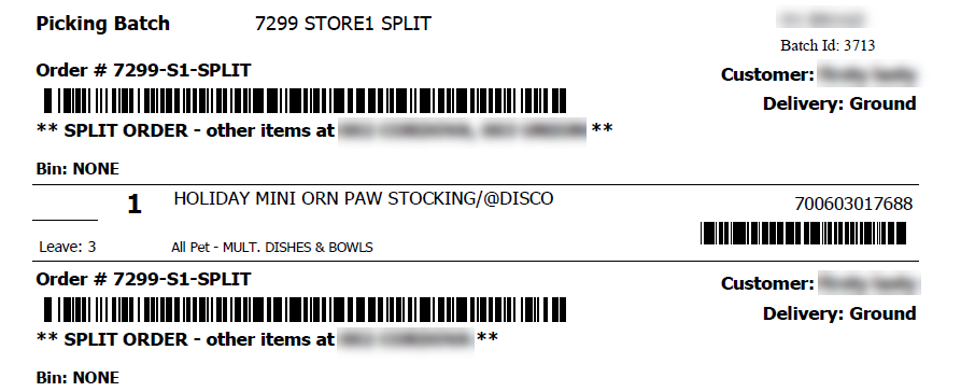
Company Setting: Show split-order banner on Marketplace Pick List
Default = False
Printed Marketplace picklists can be altered to include notes that other items are on batches or pick lists at other stores. This will denote an alert line denoting one or more other stores. If Print by Order ID is not enabled, this will not show since items group on the pick list by SKU.
Self Checkout/CFCO Employee login – Pop up keyboard added
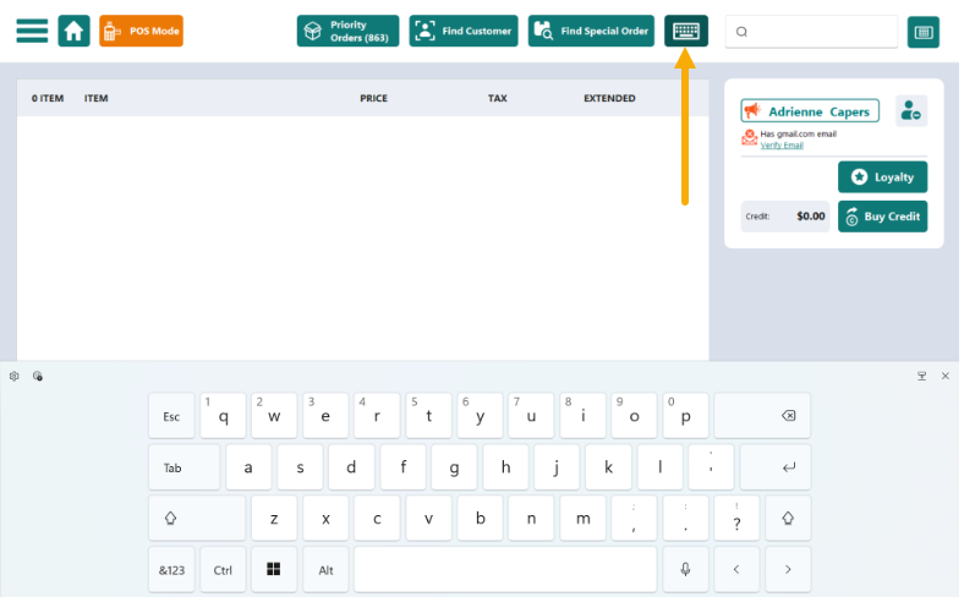
Once a clerk is in Admin mode logged in as themselves or still logged in as the self-checkout user, an On-Screen Keyboard button will appear to the left of the item search box. After logging out or returning to SCO/CFCO mode, the keyboard will disappear.
New Item Choice form – Filter & Sort
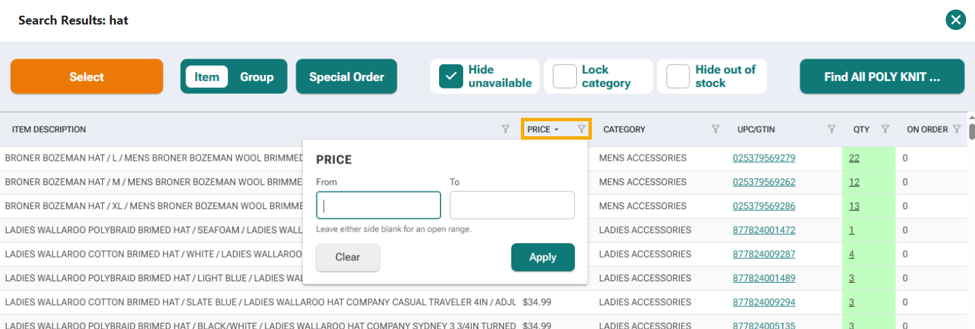
Column Header in the new item choice form support Sort & Filter. Tapping the header row will sort it alpha numerically. Tapping the filter Funnel icon will pop up an entry form that allows ranges and keywords to refine the results based on your selected column.
Crossdock/Replenishment - Allocate Forecast
Allocate Forecast has been programmed to match Allocate Minimum on the Legacy G Screen. Both of these mimics the overnight process which looks at the delta between Forecast and On Hand and calculates need assuming units are not already on active orders or transfers.
New Feature
Advanced Customer Merge
A new screen has been added to allow for "Advanced" Customer Merge functionality.
It performs the same in-store merge function as from within the POS Customer Merge, but with the added benefit of providing the user with more detailed information about the two accounts, and also includes allowing for the merging of two web-enabled accounts from within the application.
Detailed information can be found in this help article.
Bug fixes
Receipt Consolidation – Subtotal Visual on Receipt
With the item consolidation setting enabled, the subtotal of items combined could differ from the subtotal on the transaction screen depending on how they were scanned. The code that builds the receipt would calculate differently and could cause the subtotal + tax on the receipt to vary from the total by a penny or two. The receipt printing system has been recoded to reflect the transactional subtotal regardless of items being consolidated or not.
Item Edit form – Previously would not resize correctly if minimally scaled.
Image Syncing (.731) - Improvements have been made to the image syncing that occurs after FieldStack loads item data that contains items shared across multiple clients. Images should carry over from FS to clients who expect these to be imported.
Quick Access Menu (.731)
In the past version, you could not add items and categories to a Menu until a second Menu was added. This has been rectified.
SMS Opt In (.731)
SMS marketing opt in on Webstore and POS could become out of sync. This has been rectified.
Was this article helpful?
That’s Great!
Thank you for your feedback
Sorry! We couldn't be helpful
Thank you for your feedback
Feedback sent
We appreciate your effort and will try to fix the article