Return From Receipt Improvements
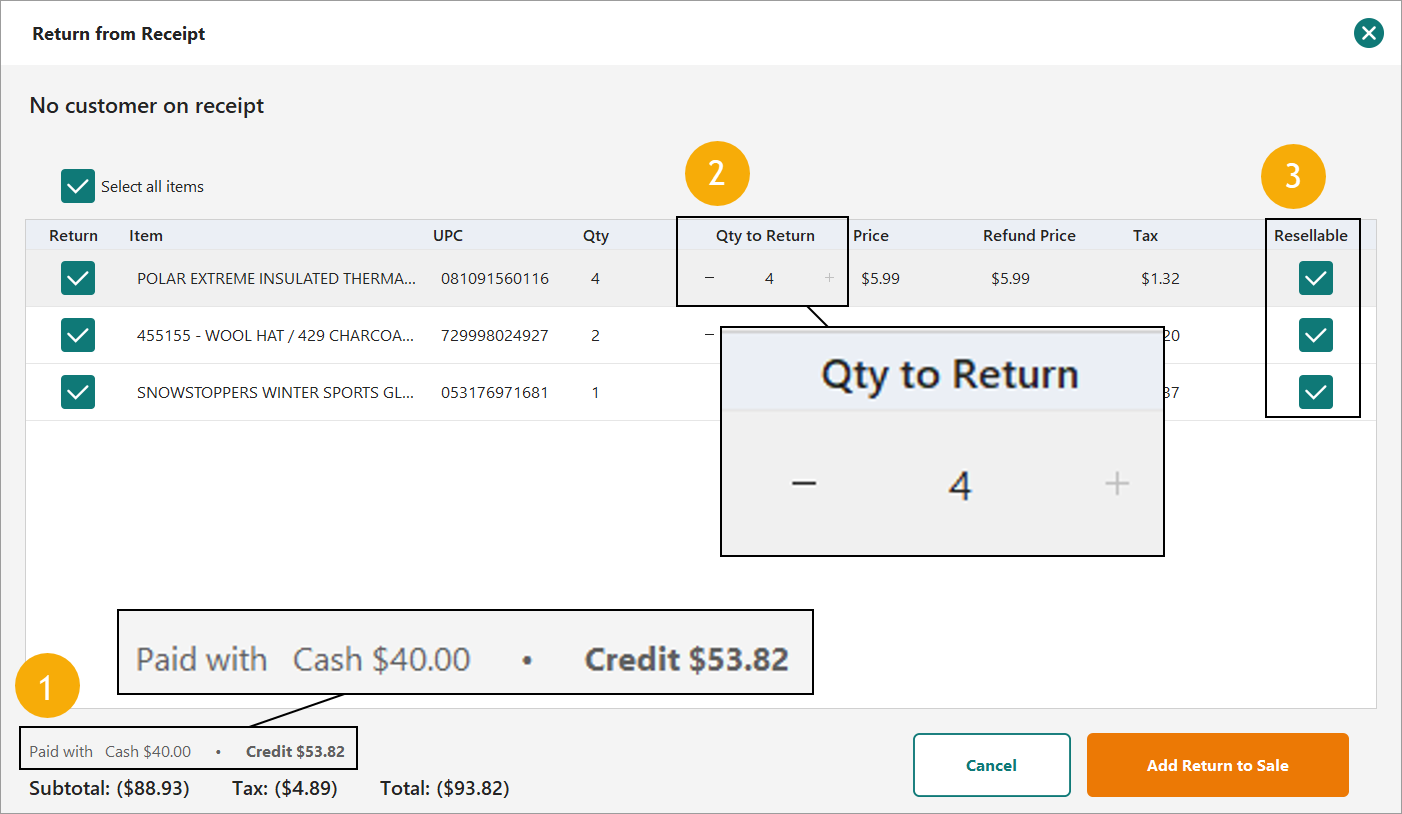
1. Tender Visualization - A "Paid with" line has been added above the totals, with the largest tender in bold. Covers cash, credit and debit, check, store credit and gift card; change nets out of cash, and a gift card remainder put on the customer's account nets against the gift card. Display only at present. This does not lead the clerk to a default return tender.
2. Quantity Handling - Qty to Return is a stepper that also takes typed numbers, capped at the units still returnable, so re-opening a partly returned receipt offers only what is left. Tax is altered as units are removed or added.
3. Resellable Toggle - A per-line Resellable checkbox now appears on this path (it previously lived on a flow Return from Receipt never used) and feeds the existing non-resellable handling and associated $0 auto-send.
Scheduled Price Changes
Schedule Price Changes (Inventory Tab - Office)
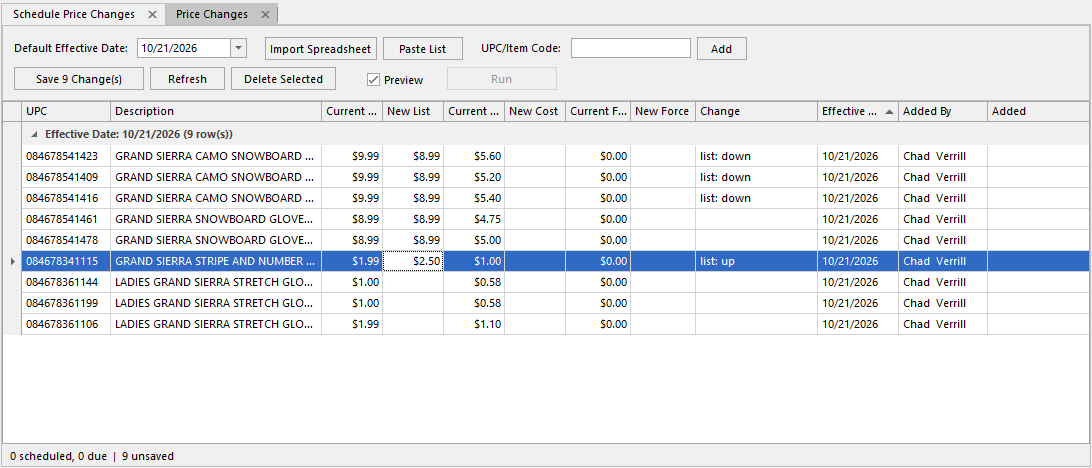
This replaces the old scheduled-price-change report. Staged price changes are shown with the item's current prices and future prices, which can be imported in the Excel file or typed directly into the interface. The item list can also be imported using a spreadsheet spreadsheet or UPC/ITcode list; unmatched entries are named and skipped. List Price, Cost Price and Force prices are editable, effective dates must be tomorrow or later, and the same item can be scheduled on several dates, with a prompt before overriding an existing schedule for the same date.
Price Changes (Retail Tab - Stores)
Stores can access a list of items that had their price updated during a selected range of time. This will pull in all items that they have on hand by default. Selecting Include On Order or Include Rated will also pull in items that are not in stock but are on the way or most likely have a designated shelf space. Each item will be listed with its new Tag Price - which may be list price or your company's calculated shelf price. The user can select to print Price Labels or Shelf Talkers and alter the number of labels to print. Selecting Print after edits are made will push labels to the printer which can be applied ot the items or shelves.
Contact Support if you would like to have the pre-existing Price Change report and Button disabled.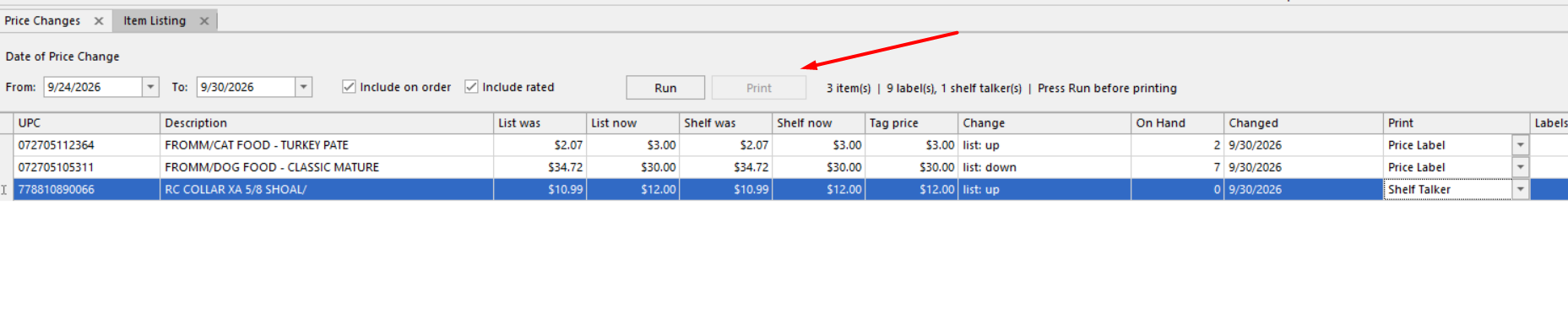
Other Improvements
Quick Access Menu - Cateogry Dropdown
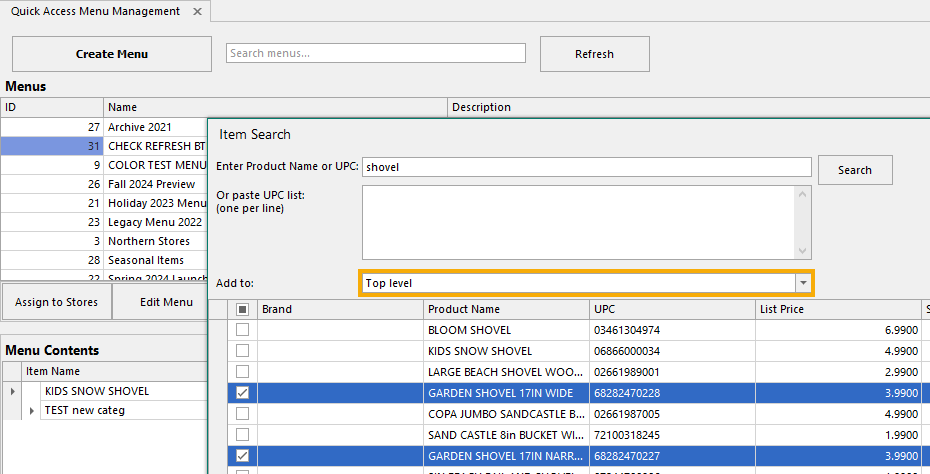
Item Search gets an "Add to:" dropdown listing the menu's categories in menu order, pre-selected to wherever you launched from and shown as a path such as "Treats > Jumbo" or "Outdoor > Garden > Shovels".
UPC One-Click Drill-Through - Crossdock, Replenishment Grid, and Vendor Order Grid
The UPC in the product detail panel is now a link that opens that single item in a new Item Listing tab, the same route as double-clicking the item number.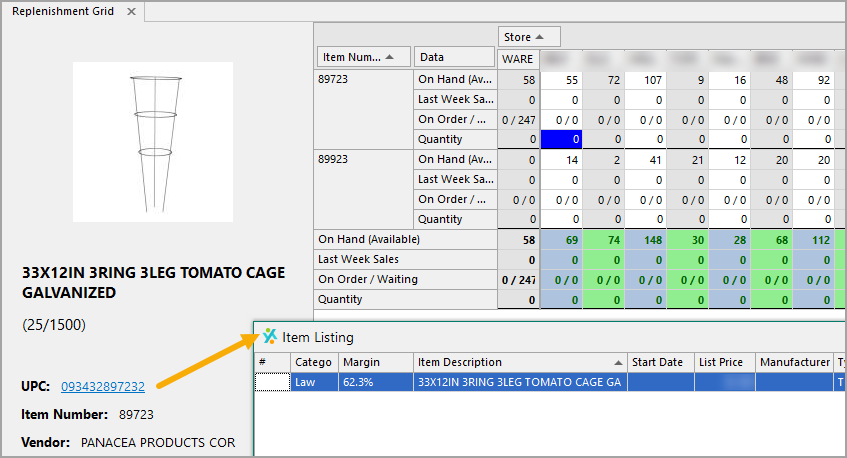
Bulk Load Employee Data
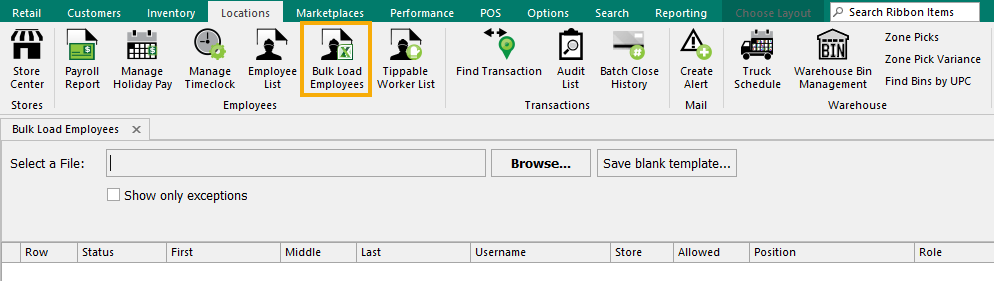
A New Form that can be accessed from the Locations tab allows many or all employees to be imported or updated at one time. Use the Save Blank Template button and match your data to those columns prior to upload. This utilizes the same data as the Employee Wizard but allows tens or hundreds of entries at the same time.
Only Administrators will see this new button.
Single-use coupon barcodes scan on every scanner configuration
Scanners set to transmit Code 39 start/stop characters sent single-use coupon codes (for example from marketing emails) wrapped in asterisks, which the register did not recognize, so the scan fell through to item search and reported "Item Not Found". Both forms now apply; an already-redeemed code still reports as redeemed and gift cards are unchanged.
Offline drawer count no longer tells a clerk to pull money — The "pull out $X" instruction now appears only on Drawer Close. The drawer count audit is skipped while offline and a dropped connection takes the register offline instead of raising an error dialog. Counts made offline stay off the Drawer Count Details report, and the drawer adjustment still syncs on reconnect.
Receive: Allow Transfer resets after each completed receive — "Allow Transfer" returns to checked once a receive completes, in both old and new POS. Registers with Thrift Mode or Print Product Tag on Receive are unaffected, since they finish a receive per scan.
Closed stores can be excluded from forecasts and warehouse orders — Closed stores were previously kept out of overnight forecast processes by hand-commenting job calls and editing hardcoded store lists. The nightly forecast, the five base-file minimum updates, the warehouse store transfer and the automatic warehouse order activation now all skip stores marked inactive. Setting a store active again restores everything on the next nightly run. Side effect: closed stores also drop out of desktop cycle counts and the physical on-hand import.
Payments: Improvements and Fixes
Marketplace payment processing is more resilient
If a single order runs into a problem during payment processing, the remaining orders now continue processing normally. The affected order is set aside and flagged for customer service review in Marketplace Center. Once it’s resolved, it can be returned to processing with Re-Activate. For orders placed together in one checkout, every order in the group is flagged together.
Issue Store Credit now available for Apple Pay orders
The Issue Store Credit option in Marketplace Center now appears on eligible Apple Pay orders, the same as it does for other payment methods.
Apple Pay now shown as the Payment Type
Apple Pay orders now show the correct Payment Type on the Order Detail tab, where this field was blank before. The correct value also carries through to order exports and customer data extracts.
Tips on fulfilled orders are only recorded after successful payment
If a payment attempt on a fulfilled order doesn’t go through, the tip is no longer recorded early. The tip is added once payment succeeds.
Was this article helpful?
That’s Great!
Thank you for your feedback
Sorry! We couldn't be helpful
Thank you for your feedback
Feedback sent
We appreciate your effort and will try to fix the article