Dynamic Donations
Action Required
Settings
Company Setting: Enable Donation Modal POS
Default: False
Location Setting: Donation Preset Amounts
Default: 1.00,2.00,3.00
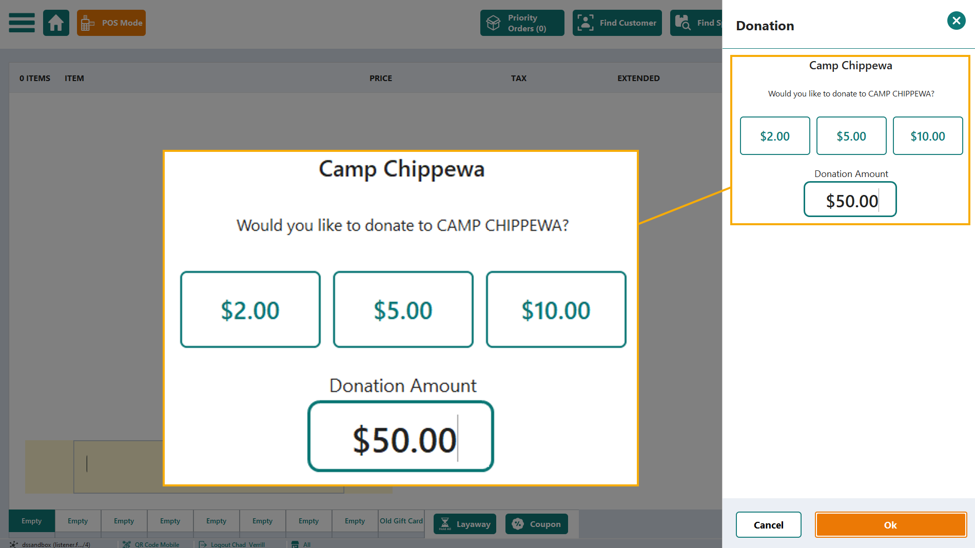
A new interactive modal can be enabled to add Donations to a sale with varying dollar amounts.
After Enabling:
Charitable Donation items - Extended Category P50 CHARITABLE DONATION
Will pop up with selections for $1.00, $2.00, $5.00 or a variable donation amount (above.)
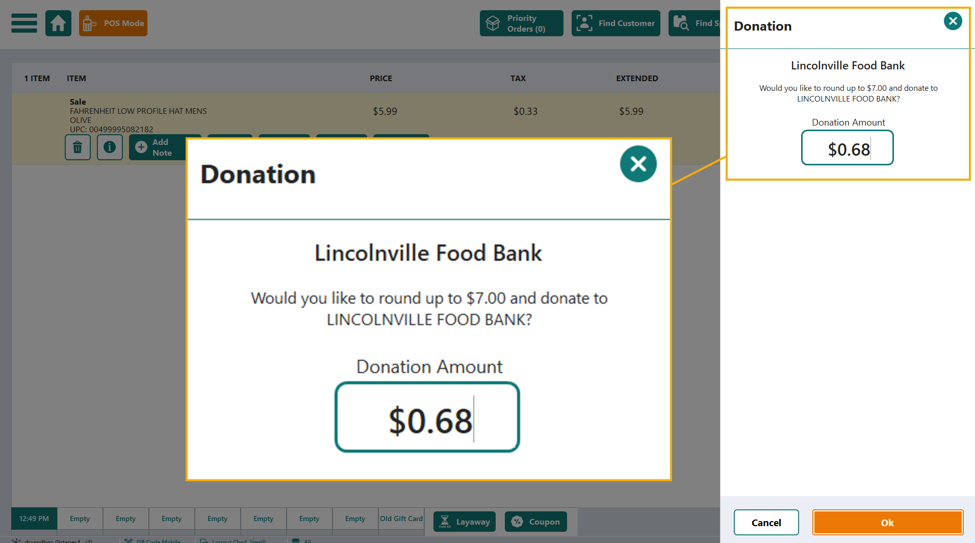
Round Up Donation Items – Extended Category RDU ROUNDUP FOR CHARITY
Will pop up Modal with pre-calculated delta to next dollar (below.)
Future intentions:
- Consider an interface for handling individual donations across store groups and date spans.
- Consider auto pop up for selected Donation or Round Up ion self-checkout.
- Investigate possibility of pushing Modal to CC Reader in either scenario.
Round Up Donation:
Quick Access Menu
Refresh button has been added to the interface. If menus are being edited across multiple tabs, or multiple people, the Refresh button will capture changes made outside the current view.
Extended Item Name has been added to the Item Name column in the desktop interface. This helps clerks on the POS-side by adding a secondary line of info, when one exists on the item.
Email Marketing Opt-In Default
Action Required
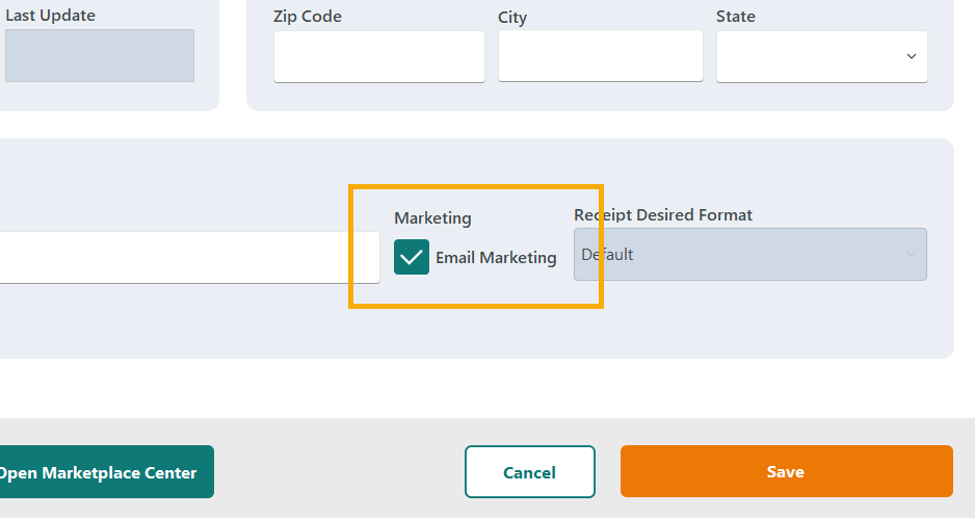
Location setting: Default New Customers to Marketing Email Opt-In
Default: False
When enabled, this setting will cause the Email Marketing opt-in checkmark to default to checked when creating a new customer account.
Online Special Order Case handling
Phase 1 Changes
For clients who allow online special orders of Virtual Cases, an improvement has been made to ensure the special order and marketplace order are properly assigned to the pre-determined hub shipping location.
How an online special order of a virtual case processes:
- Customer orders a virtual case
- If not in stock, the marketplace order will assign to WebStore
- The system cycles through such orders and will assign the marketplace order to the correct pick up location or hub shipping store
- The system will special order a case from the primary vendor
- A buyer/merchandising team member may need to change this case line item to multiples of eaches depending on your vendor order processes
- When the case arrives, it will be received as eaches (there is no mechanism to receive virtual cases against a PO of eaches)
- The special order for the virtual case will NOT be marked as arrived
- Since a pending marketplace order for a case exists for that store, the virtual case order will allocate to the picklist to pick the eaches
- Upon scan out, the special order will be marked as Completed by the system
Phase 2
In the future, we will translate the Virtual Case to eaches in the Special Order system or on the Vendor Order to ensure consistency in ordering. The marketplace order will still exist and function as a virtual case. We will also try to rectify the receive process to properly mark the special order as arrived.
Hold = Layaway for Department Stores
If your business refers to items Holds as Layaways, and your Company Vertical is set to Department, the Hold All button, when enabled, will read “Layaway.”

Call Off Order Grid Improvements
Three improvements to the desktop interface have been made:
- Added left column as Item Num. Ext
- All column headers Sortable and filterable
- Included total line which shows the original warehouse total and each store's overall total. As store quantities are entered, the warehouse overall total will reduce.
Item Choice Form
Blazor Item Choice Form: Department
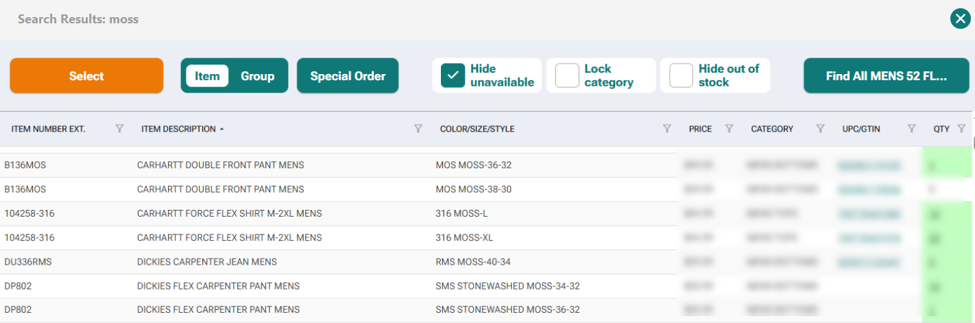
When your Company Vertical is set to Department, and the new Blazor Item Choice Form is enabled, you will see the following changes:
- Addition of Item Number column
- Reduced Item Description text redundancy
- Addition of Color/Size/Style column
- Exclusion of On Order column
Blazor Item Choice Form Bug Fixes
Within the new Item Choice Form in POS search, several issues have been rectified:
- CTRL + F functional parity with previous Item Choice Form
- Item Description on details panel no longer pushes below buttons if 3 lines of characters exist.
- Hide Unavailable works consistently.
- Lock Category is using full Category name instead of beginning characters.
- Columns of pertinent data have been narrowed to increase Item Description column(s).
Bug Fix
Loyalty Redemption - Previously, if you added a customer with a loyalty redemption available to a transaction, then added a qualifying item and press Redeem Item, then remove the customer, the loyalty redemption remained and kept its value. With this release, removal of a customer while a redemption value is populated to the transaction, will also remove that redemption.
Was this article helpful?
That’s Great!
Thank you for your feedback
Sorry! We couldn't be helpful
Thank you for your feedback
Feedback sent
We appreciate your effort and will try to fix the article