There are two versions of this report. Both show the piece count and cost value of items transferred between store locations for a selected date range, grouped by sending and receiving store.
Note: Some clients may have a customized version of this report.
Transfer Value By Store (Order Cost)
Shows the piece count and cost value of items transferred between store locations, summarized by sending and receiving store for the selected date range. Values are calculated using the item's catalog cost price at the time the transfer was ordered.
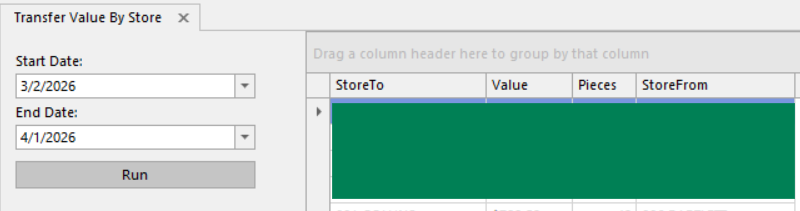
Report columns:
- StoreTo - Receiving store name
- Value - Total cost value of items transferred (based on item cost price at time of order)
- Pieces - Total number of items transferred
- StoreFrom - Sending store name
Transfer Value at Receive By Store (Receive Cost)
Shows the piece count and cost value of items transferred between store locations, broken out by day. Values are calculated using the actual cost recorded when the items were received, which may differ from catalog cost if prices changed between ordering and receiving. Includes summary totals for each store pair.
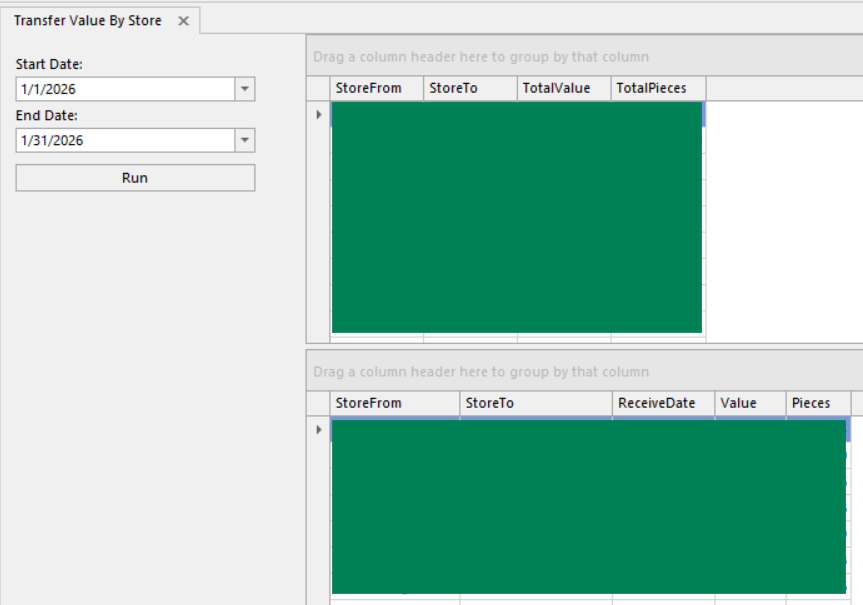
Report columns:
- Summary (Top):
- StoreFrom - Repeated for summary row grouping
- StoreTo - Repeated for summary row grouping
- TotalValue - Running total value per StoreFrom/StoreTo pair
- TotalPieces - Running total pieces per StoreFrom/StoreTo pair
- Details (Bottom):
- StoreFrom - Sending store name
- StoreTo - Receiving store name
- ReceiveDate - Date items were received
- Value - Cost value of items transferred (based on actual cost at time of receipt, not catalog cost)
- Pieces - Number of items transferred
Was this article helpful?
That’s Great!
Thank you for your feedback
Sorry! We couldn't be helpful
Thank you for your feedback
Feedback sent
We appreciate your effort and will try to fix the article